Nowadays, e-commerce is used widely all around the world. In the developed country, the usage of e-commerce is extremely high as compare to Malaysia. The main reason that Malaysian does not practice e-commerce in daily life is because they feel unsecure. They worried that their personal details will be disclosed in the internet since there are lots of fake website existed.
Therefore, 3rd party certification programme took place to ensure the securities of users where a digital certificate issued. A digital certificate is a digital document that validates the identity of the certificate’s owner. Certificate Authority (CA), a trusted party, issued the digital certificates to users or to organizations. Furthermore, the digital certificate will valid for a certain period of time.
Digital certificates rely on public key cryptography for their own authentication. When a digital certificate is issued, the issuing certification authority signs the certificate with its own private key. To validate the authenticity of a digital certificate, a user can obtain that certification authority’s public key and use it against the certificate to determine if it was signed by the certification authority.
For a digital certificate to be useful, it has to be structured in an understandable and reliable way so that the information within the certificate can be easily retrieved and understood. The S/MIME standard specifies that digital certificates used for S/MIME conform to the International Telecommunications Union (ITU) X.509 standard. S/MIME version 3 specifically requires that digital certificates conform to version 3 of X.509. Because S/MIME relies on an established, recognized standard for the structure of digital certificates, the S/MIME standard builds on that standard’s growth and thus increases its acceptance. The X.509 standard specifies that digital certificates contain standardized information. Specifically, X.509 version 3 certificates contain version number, serial number, certificate algorithm identifier, issuer name, validity period, subject name, subject public key information, issuer unique identifier, subject unique identifier, extension and certification authority’s digital signature.
MSC Trustgate
The most popular 3rd party certification programme in Malaysia, MSC Trustgate.com Sdn Bhd, is corporate in 1999. It is licensed under the Digital Signature Act 1997 (DSA), a Malaysia law that sets a global precedent for the mandate of a Certificate Authority. The vision of the corporate is “To enable organization to conduct their business securely over the Internet, as much as what they have been enjoying in the physical world.” Followings are some of the products and services in MSC Trustgate: As a conclusion, a secure infrastructure is essential on the E-commerce in order to protect the publishers and users. The establishment of Certificate Authority plays a vital role not only to issue digital certificate but also have to ensure the security of E-commerce website. We, as an Internet users, must be aware with the security trademark to prevent from become a victim of security issues.
The application of 3rd party certification programme in Malaysia
How to safeguard our personal and financial data?

We live in an increasingly online world. Many transactions can be done through internet, such as online banking, booking, buying, auction and etc. However, it raise the issues that hacker who to hack into computer in order to theft those confidential data. So, keeping our personal and financial data as secure as possible. In the following, some guidelines learn to keep our private personal and financial data safe online.

1. Choose your PIN wisely. While we want to choose something we’ll remember, we don’t want it to be something that a clever thief could figure out just by learning our birth date or your child’s name. A combination of uppercase and lowercase letters, numbers, and symbols will offer us more security.
2. Secure network. If we have a wireless network at home or workplace, make sure that it is secure. A hacker can gain access to anything you do over an unsecured network in a matter of seconds. If we look at the documentation for wireless router, we’ll be able to find out how to lock router and encrypt our information. It won’t affect the way we use wireless network, but it will keep intruders from getting a hold of info.
3. Don’t reuse passwords. As tempting as it may be to reuse passwords, it’s a really good practice to use a different password for every account we access online. This way, if someone does find out what our password is for one credit card, they won’t also be able to access our checking, brokerage and email accounts. It may take a little more organization to use different passwords for each site, but it can help marginalize the effects of unauthorized access to your accounts.
4. Don’t put private information on public computers. If we’re away from home, make sure not to save private information onto a computer used by the public. If we’re accessing a private account at the library or cyber café, make sure to log out completely from our accounts, and never choose to save login information (like username or password) on these computer.
5. Protect computer’s security. Use as many tools as you can to guard our computer information from the nefarious. Failing to protect our computer is just as bad as leaving your door unlocked, your windows wide open, and a sign on the mat, saying, “Burglars, come on in.”
Phishing: Examples and its prevention methods

Phishing is the process of attempting information illegally and fraudulently through the internet such as the usernames, passwords and credit card details by creating a fake websites which mislead the real company’s customers to enter their details at the website. Examples like the PayPal, eBay, and online banks. These are many examples of phishing e-mail such as showing below. 

For more examples, visit the link below.
Below are the methods that can prevent phishing:
Eliminating phishing mail
Specialized spam filters can reduce the number of phishing e-mails that reach their addressees inboxes. These approaches rely on machine learning and natural language processing approaches to classify phishing e-mails.
Monitoring and takedown
Several companies offer banks and other organizations likely to suffer from phishing scams round-the-clock services to monitor, analyze and assist in shutting down phishing websites. Individuals can contribute by reporting phishing to both volunteer and industry groups, such as Phistank.
Helping to identify legitimate sites
Since phishing is based on impersonation, preventing it depends on some reliable way to determine a website's real identity. For example, some anti-phishing toolbars display the domain name for the visited website. The pet name extension for Firefox lets users type in their own labels for websites, so they can later recognize when they have returned to the site. If the site is suspect, then the software may either warn the user or block the site outright.Browsers alerting users to fraudulent websites
Another popular approach to fighting phishing is to maintain a list of known phishing sites and to check websites against the list. Microsoft's IE7 browser, Mozilla Firefox 2.0, and Opera all contain this type of anti-phishing measure. Firefox 2 uses Google anti-phishing software. Opera 9.1 uses live blacklists from PhishTank and GeoTrust, as well as live whitelists from GeoTrust. Some implementations of this approach send the visited URLs to a central service to be checked, which has raised concerns about privacy. According to a report by Mozilla in late 2006, Firefox 2 was found to be more effective than Internet Explorer 7 at detecting fraudulent sites in a study by an independent software testing company.

An approach introduced in mid-2006 involves switching to a special DNS service that filters out known phishing domains: this will work with any browser, and is similar in principle to using a hosts file to block web adverts.
To mitigate the problem of phishing sites impersonating a victim site by embedding its images (such as logos), several site owners have altered the images to send a message to the visitor that a site may be fraudulent. The image may be moved to a new filename and the original permanently replaced, or a server can detect that the image was not requested as part of normal browsing, and instead send a warning image.
Augmenting password logins
A method to prevent simple phishing of transaction numbers (TANs) is to associate each TAN with a "lock number". The bank's server sends the lock number as a challenge, and the user provides the corresponding TAN as the response. The server selects the key-lock pair randomly from the list to prevent acquiring two consecutive TANs. Lock numbers are not sequential, so that phishers can only guess correct lock numbers.
The threat of online security: How safe is our data?
 Do you ever think that how safe is your data? Nowadays, people often create, store and manage critical information through computer. All kinds of activity from banking to storing company's personal details are done through internet. Consequently, it is important for users to aware that computer security plays a major role in protecting their data from loss, damage and misuse.
In today's world, you need to worry about security for your PC in a whole different way. Spyware, adware, viruses and trojans are lucking online, waiting to infect your computer. These threats evolve over time and always find a better way to better the security software. Therefore, it is important to update security softwares frequently to keep our data safe from these threats. Here are some of the threats to your PC :
1. Spyware

Spyware is a type of malware that is installed surreptitiously on personal computer to collect information about users, their computer or browsing habits without their informed consent. Spyware is usually engineered to watch your online activity and uncover security flaws. The best way to avoid spyware is to avoid the sites and e-mails that leave it on your PC. There are a number of programs available that offer spyware removal and detection and can be downloaded for free at sites such as download.com.
2. Identity Theft

Identity theft occurs when a criminal uses anoher person's personal information to take on that person's identity.There have variety of methods that hackers can steal your information through the PC. Once this information is gained, it will be used to make online purchases using your credit card data, divert paychecks and create false documents. Usually, the top internet security software comes with some protection against this problem. An internet security suite may be your best bet to protect youronline information. The quick tips to protect yourself against online ID theft is never provide your credit card info to any site that does not offer multiple forms of internet security to protect your transaction.
3. Spam Mail

Spam by e-mail is a type of spam that involves sending identical or nearly identical messages to thousand ( or millions ) of recipients. Spam mail itself is not dangerous. However, it can have malicious links that can do everything from cause your PC to be infected by a virus, introduce spyware, and attract more spam. A good internet spam filter is usually a good option. The auick internet security tip is when typing your address into the net, try to use a combination of 13 letters and numbers. This will make it difficult for address to be added spam mail list.

Phishing is the criminally fraudulent process of attempting to acquire sensitive information such as usernames, passwords and credit card details by masquerading as a trustworthy entity in an electronic communication. Phishing is normally carried out by e-mail or instant messaging an it often directs users to enter details at a fake website whose look and feel are almost similar to the real one. The scammers will then use this personal information for their own purposes, or sell the information to other criminal parties. The best way to avoid phishing attacks is not to click any e-mails that you believe to be suspicious. Besides that, you may also update your web browser with phishing detection. Internet security software package such as Webroot's Spysweeper and ZoneAlarm Internet Security Suite have great phishing detection systems.
5. Virus

Computer virus is a self-replicating or self-reproducing program that are designed to spread from one computer to another computer and to interfere with computer operation. Virus are one of several types of malicious software or malware. A basic rule is that computer virus cannot directly damage hardware, but only software. Viruses are most easily spread by attachments in e-mail messages or instant messaging messages. Viruses can be disguised as attachment of funny images, greeting cards, or audio and video files. Besides that, viruses also can spread through downloads on the the internet.
References :
Identify and compare the revenue model for Google, Amazon.com and eBay
Revenue model can be defined as the technique or method that is adopted by the e-commerce company in generating the business revenue from its website.Basically, there are five types of revenue model which are stated as below:
(1) Sales revenue - Revenue generated by selling of goods, services, and merchandise information provided in the publisher's website.
(2) Transaction fee - Commission earned by the company based on either the volume of successful transaction or fixed fee per transaction successful conducted.
(3) Advertising fee - Fee that is charged by the web publisher company to advertiser, by letting the space in publisher's website to advertise the product in different form of advertisement.
(4) Subscription fee - The users have to pay a fixed amount of fees for subscription of contents or services provided by the website.
(5) Affiliate fee - Fee that earned by the company for referring customers to other websites.
Now we will identify and compare the revenue model for Google, Amazon.com and eBay respectively.
-Google-

Google is the most widely-used web search engine in the world. There are thousands million of internet users all around the world search information via Google search engine everyday. Besides that, it also provides a variety of free of charge internet services such as Blogger (web log), Google Mail (electronic mail) and etc.
Google does not charge any fee on the internet services that it provided for example Gmail, G-talk, but how does it gain huge profit every year? In fact, its revenue model mainly from advertising fee related to its internet services. This consists of about 99 percent of overall revenue. Besides that, Google also earns revenues from sale of its advertising-free version of the internet services. The advertising fees of Google mainly consist of Google Adwords and Google Adsense.
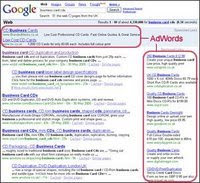 Google Adwords is the main revenue source of Google. It offers pay-per-click (PPC) advertising, and site-targeted advertising for both banner ads and text. Pay-per-click (PPC) advertising means that the advertisers need to pay to Google every time the advertisement received a click. The advertisement is designed to appear beside the search result pages of the Google seach engine in text form. It allows the advertisers to present advertisements to users when the users are searching for information related to what the advertisers have to offer.
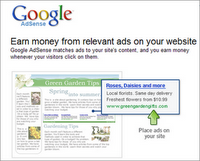 Google Adsense is another advertising method adopted by Google. The difference of it is that the website owners (including blogs) can display Google advertisements on their websites and they are able to earn the revenue with Google every time the ads are clicked by visitors while Google Adwords only appear in Google website and the ads-clicked only earned by Google. Website owners of Google Adsense service have the opportunity to display the ads in their websites in various forms such as text, image and video. These ads can generate revenue on either a per-click or per-thousand-impressions basis. However, all the Google Adsense ads are administered by Google.
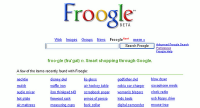 Google Product Search ( or formerly known as Froogle) is a price comparison service that makes the users easier in searching information and comparing for online product sale. There is a misunderstanding that Google has earned revenue by charging any fees for listings, payment for products to show up or commission on sale. In fact, Google does not do so, but it only earns revenue by Google Adwords to be displayed in Product Search results adjacent to the unpaid results. Currently, Google has started the testing on a new advertising programme called Cost-Per-Action, which is based on cost-per-click model. It differs from Adsense in the way that a site owner can only get the pay whenever a visitor clicks on an ad and conducts a specific action, such as purchasing a product from the advertiser.
-Amazon.com-

Amazon.com is a marketplace where allows sellers to offer their good alongside Amazon's offerings. A website can use a combination of revenue models to generate revenue. Amazon.com is a prime example of the e-commerce model or e-tailing. Amazon generates revenue primarily by selling books, videos, electronics, and kitchen equipment on domestic and international website, such as Amazon Marketplace. However, Amazon is also a pioneer in affiliate partnership marketing. An Amazon partner website can display Amazon books ( and review etc.) directly on their website, and sends customers to the Amazon's website when the visitor is ready to buy it. In turn, Amazon pays a commission for the sale to the site owner.
An e-commerce model is the most well known revenue stream where the website sells products or services online. Every e-commerce entity on the internet should have a business model that performs on the internet.
E-Tailing (electronic retailing) is the selling of retail goods on the internet. E-tailing is synonymous with business-to-consumer (B2C) transaction.Besides sale of goods, Amazon.com also generates revenue through sale of web services, for example Amazon Simple Storage Services (S3), Amazon Elastic Compute (EC2) and etc. Amazon S3 is an online storage web service that provides unlimited storage through a simple web services interface. Amazon EC2 is a commercial web service that allows customers to rent computers on which to run their own computer applications.
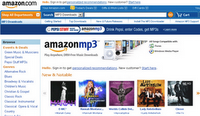 Advertising fee is also one of the revenue sources for Amazon.com. It offers a suite of advertising channels for advertisers including online products ads, online display advertising, and Clickriver ads, which ads promote services alongside with Amazon's products.
-eBay-

eBay is an online aution and shopping website. It provides an electronic marketplace for people to buy amd sell various merchandise and servise worldwide. It has millions of transactions listed, bought and sold daily, the items sold including collectibes, decor, appliances, computers, furnishings, equipment, vehicles and others. It has set up localized websites in about thirty countries including Malaysia.
EBay generates revenue by of various fees nand commissions such as insertion fees, promotional fees and final value fees. To start with, eBay charged an insertion fees based on the openning price of the merchandise.
-Insertion fees ~ when an item listed on eBay, this nonrefundable fee is charged.
-Promotional fees ~ an extra fee that charged for additional listing options which can enhance the advertising and promotion of an item, such as highlighted or bold listings.
-Final value fees ~ the commissions that charged to the seller at the end of the auction.Besides that, eBay earns transaction fee from owning paypal, an online paying service system for users to buy items online more conveniently. Ebay also gains sales from the service of listing customer's product to be sold to other users as well as some advertisement fee. Ebay's revenue increases with seller surplus. Its liquidity promotes a lock in, which keeping current customers happy and acquires new customers.
In conclusion, Google, Amazon.com and eBay have proved that every e-commerce comany would adopt different method of revenue models in its own way. Google relies mostly on advertising fees and small portion of sales. Amazon.com gains mostly on sale of products and services and relatively small amount in advertising and transaction fees while eBay mainly on transaction fees.
References:
http://en.wikipedia.org/wiki/Adsense
http://en.wikipedia.org/wiki/Amazon_Marketplace
http://en.wikipedia.ord/wiki/Ebay
(1) Sales revenue - Revenue generated by selling of goods, services, and merchandise information provided in the publisher's website.
(2) Transaction fee - Commission earned by the company based on either the volume of successful transaction or fixed fee per transaction successful conducted.
(3) Advertising fee - Fee that is charged by the web publisher company to advertiser, by letting the space in publisher's website to advertise the product in different form of advertisement.
(4) Subscription fee - The users have to pay a fixed amount of fees for subscription of contents or services provided by the website.
(5) Affiliate fee - Fee that earned by the company for referring customers to other websites.
Now we will identify and compare the revenue model for Google, Amazon.com and eBay respectively.
-Google-

Google is the most widely-used web search engine in the world. There are thousands million of internet users all around the world search information via Google search engine everyday. Besides that, it also provides a variety of free of charge internet services such as Blogger (web log), Google Mail (electronic mail) and etc.
Google does not charge any fee on the internet services that it provided for example Gmail, G-talk, but how does it gain huge profit every year? In fact, its revenue model mainly from advertising fee related to its internet services. This consists of about 99 percent of overall revenue. Besides that, Google also earns revenues from sale of its advertising-free version of the internet services. The advertising fees of Google mainly consist of Google Adwords and Google Adsense.
 Google Adwords is the main revenue source of Google. It offers pay-per-click (PPC) advertising, and site-targeted advertising for both banner ads and text. Pay-per-click (PPC) advertising means that the advertisers need to pay to Google every time the advertisement received a click. The advertisement is designed to appear beside the search result pages of the Google seach engine in text form. It allows the advertisers to present advertisements to users when the users are searching for information related to what the advertisers have to offer.
 Google Adsense is another advertising method adopted by Google. The difference of it is that the website owners (including blogs) can display Google advertisements on their websites and they are able to earn the revenue with Google every time the ads are clicked by visitors while Google Adwords only appear in Google website and the ads-clicked only earned by Google. Website owners of Google Adsense service have the opportunity to display the ads in their websites in various forms such as text, image and video. These ads can generate revenue on either a per-click or per-thousand-impressions basis. However, all the Google Adsense ads are administered by Google.
 Google Product Search ( or formerly known as Froogle) is a price comparison service that makes the users easier in searching information and comparing for online product sale. There is a misunderstanding that Google has earned revenue by charging any fees for listings, payment for products to show up or commission on sale. In fact, Google does not do so, but it only earns revenue by Google Adwords to be displayed in Product Search results adjacent to the unpaid results. Currently, Google has started the testing on a new advertising programme called Cost-Per-Action, which is based on cost-per-click model. It differs from Adsense in the way that a site owner can only get the pay whenever a visitor clicks on an ad and conducts a specific action, such as purchasing a product from the advertiser.
-Amazon.com-

Amazon.com is a marketplace where allows sellers to offer their good alongside Amazon's offerings. A website can use a combination of revenue models to generate revenue. Amazon.com is a prime example of the e-commerce model or e-tailing. Amazon generates revenue primarily by selling books, videos, electronics, and kitchen equipment on domestic and international website, such as Amazon Marketplace. However, Amazon is also a pioneer in affiliate partnership marketing. An Amazon partner website can display Amazon books ( and review etc.) directly on their website, and sends customers to the Amazon's website when the visitor is ready to buy it. In turn, Amazon pays a commission for the sale to the site owner.
An e-commerce model is the most well known revenue stream where the website sells products or services online. Every e-commerce entity on the internet should have a business model that performs on the internet.
E-Tailing (electronic retailing) is the selling of retail goods on the internet. E-tailing is synonymous with business-to-consumer (B2C) transaction.Besides sale of goods, Amazon.com also generates revenue through sale of web services, for example Amazon Simple Storage Services (S3), Amazon Elastic Compute (EC2) and etc. Amazon S3 is an online storage web service that provides unlimited storage through a simple web services interface. Amazon EC2 is a commercial web service that allows customers to rent computers on which to run their own computer applications.
 Advertising fee is also one of the revenue sources for Amazon.com. It offers a suite of advertising channels for advertisers including online products ads, online display advertising, and Clickriver ads, which ads promote services alongside with Amazon's products.
-eBay-

eBay is an online aution and shopping website. It provides an electronic marketplace for people to buy amd sell various merchandise and servise worldwide. It has millions of transactions listed, bought and sold daily, the items sold including collectibes, decor, appliances, computers, furnishings, equipment, vehicles and others. It has set up localized websites in about thirty countries including Malaysia.
EBay generates revenue by of various fees nand commissions such as insertion fees, promotional fees and final value fees. To start with, eBay charged an insertion fees based on the openning price of the merchandise.
-Insertion fees ~ when an item listed on eBay, this nonrefundable fee is charged.
-Promotional fees ~ an extra fee that charged for additional listing options which can enhance the advertising and promotion of an item, such as highlighted or bold listings.
-Final value fees ~ the commissions that charged to the seller at the end of the auction.Besides that, eBay earns transaction fee from owning paypal, an online paying service system for users to buy items online more conveniently. Ebay also gains sales from the service of listing customer's product to be sold to other users as well as some advertisement fee. Ebay's revenue increases with seller surplus. Its liquidity promotes a lock in, which keeping current customers happy and acquires new customers.
In conclusion, Google, Amazon.com and eBay have proved that every e-commerce comany would adopt different method of revenue models in its own way. Google relies mostly on advertising fees and small portion of sales. Amazon.com gains mostly on sale of products and services and relatively small amount in advertising and transaction fees while eBay mainly on transaction fees.
References:
http://en.wikipedia.org/wiki/Adsense
http://en.wikipedia.org/wiki/Amazon_Marketplace
http://en.wikipedia.ord/wiki/Ebay
An example of an E-Commerce failure and its causes
 An example of failure in e-commerce is Pets.com. Pets.com attempted to sell pet accessories and supplies directly to the customer over the web
Pets.com was launched in November 1998 by Greg McLemore. Then it was purchased by a venture capitalist firm in early 1999. Amazon.com backed Pets.com raised $82.5 millions in an IPO funds in February 2000. However, Pets.com was gone into liquidation in November 6, 2000.
Lack of experience in management and poorly constitute business plan led to downfall of Pets.com. Company has raised multimillion-dollar in just advertisement fees. Besides that, the CEO and management department had little or no experience in running the business. Moreover, because the company had to undercharge for shipping costs to attract customers, it actually was loosing money on every shipment it made.
Furthermore, the information of Pets.com was insufficient. Customer just can view the photo of the pets but cannot touch the pet by themselves via internet. This makes them loss confident to trust on the quality and healthy condition of the pet. If customer really wants buy the pet or the accessories for pet, Pets.com was never able to give customer confirm days the pet can deliver, a customer had to wait a few days to actually get the pet or accessories for pet.
It is very important to know the demand and needs of customer as to satisfy customer service to the customer but Pets.com fail to do this; this causes Pets.com failure in e-commerce.
After see the failure of e-commerce, we must do a lot of strategic planning before implementing e-commerce.
The history and evolution of E-commerce
 In the beginning, the Earth was without form, and void; and darkness was on the face of the deep. Telegraph (demonstrated in 1884) spread with railroads in the mid 1800’s then Transatlantic Cables from 1857 to 1866. Until very recently, only computer people had computers started to change in the 1980’s and paradigm shift in 1995 – the World Wide Web (www). The history of this cast improving system is how information technology has transformed business processes into how it is today.
In order to prove that the best paradigm would be shopping, which I am sure is a popular method for relaxing notwithstanding women or men and could be done anytime, anywhere, even in your pyjamas! Now this brings us back to the invention of the very old notion of ‘buy and sell’ electricity, cables, computers, modems and the internet of course! Started in 1991, it was made possible to do shopping online and since then, hundreds and thousands of business started to venture into this promising approach - the E-commerce.
The meaning of electronic commerce has changed over the last 30 years. Originally, electronic commerce meant the facilitation of commercial transactions electronically, using technology such as Electronic Data Interchange (EDI) and Electronic Funds Transfer (EFT). These were both introduced in the late 1970s, allowing businesses to send commercial documents like purchase orders or invoices electronically. The growth and acceptance of credit cards, automated teller machines (ATM) and telephone banking in the 1980s were also forms of electronic commerce. Another form of e-commerce was the airline reservation system typified by Sabre in the USA and Travicom in the UK. Online shopping was invented in the UK in 1979 by Michael Aldrichand during the 1980s it was used extensively particularly by auto manufacturers such as Ford, Peugeot-Talbot, General Motors and Nissan. From the 1990s onwards, electronic commerce would additionally include enterprise resource planning systems (ERP), data mining and data warehousing.
We can’t run away from sites like Amazon.com and Ebay when talking about e-commerce. They are one of the first few internet companies to allow electronic transactions and succeed. Nowadays, the 5 largest and most famous worldwide Internet retailers are Amazon, Dell, Staples, Office Depot and Hewlett Packard. According to statistics, the most popular categories of products sold in the World Wide Web are music, books, computers, office supplies and other consumer electronics.


Lastly, e-commerce is a history of a new, virtual world which is evolving according to the customers’ advantage. The evolution of this will never end. As long as technology breaths in the air, it will continue improving for the better. E-commerce has come a long way, evolving from organizations billboards to a fully functional personalized shopping experience. Although the road was bumpy from 1994-2004, it has now become a crucial part of Internet pioneers and technology innovators.
In conclusion, e-commerce today is still at its infancy. Invisible shopping carts, annoyance-free assistance and no lines at the register and many more benefits awaits the future of e-commerce. There is a bright future for it. Besides narrowcasting, there are also services like new quantum processors that will increase the speed of computers twice as fast and HDTV’s popularity allows us to surf and shop on their television sets.
Here are the summary of years and trends for the evolution of e-commerce...
* 1984- Electronic Data Interchange or EDI was standardized through ASCX12. This guaranteed that companies would be able to complete transactions with one another reliably.
* 1992- Compuserve offers online retail products to its customers. This gives people the first chance to buy things off their computer.
* 1994- Netscape arrived. Providing users a simple browser to surf the internet and a safe online transaction technology called as Secure Sockets Layer.
* 1995- Amazon and Ebay were the 1st international companies that implemented electronic transactions.
* 1998- DSL,or Digital Subscriber Line, provides fast, always-on internet service to subscribers across California. This prompts people to spend more time and money to online.
* 1999- Retail spending over the internet reaches $20billion according to the Business.com
* 2000- The US government exended the moratorium on internet taxes until at least 2005.
References:
http://www.ecommerce-land.com/history_ecommerce.html
http://www.ecommercedevelopment-web.com/ecommerce-blog/62-history-of-e-commerce.html
http://en.wikipedia.org/wiki/Electronic_commerce
In conclusion, e-commerce today is still at its infancy. Invisible shopping carts, annoyance-free assistance and no lines at the register and many more benefits awaits the future of e-commerce. There is a bright future for it. Besides narrowcasting, there are also services like new quantum processors that will increase the speed of computers twice as fast and HDTV’s popularity allows us to surf and shop on their television sets.
Here are the summary of years and trends for the evolution of e-commerce...
* 1984- Electronic Data Interchange or EDI was standardized through ASCX12. This guaranteed that companies would be able to complete transactions with one another reliably.
* 1992- Compuserve offers online retail products to its customers. This gives people the first chance to buy things off their computer.
* 1994- Netscape arrived. Providing users a simple browser to surf the internet and a safe online transaction technology called as Secure Sockets Layer.
* 1995- Amazon and Ebay were the 1st international companies that implemented electronic transactions.
* 1998- DSL,or Digital Subscriber Line, provides fast, always-on internet service to subscribers across California. This prompts people to spend more time and money to online.
* 1999- Retail spending over the internet reaches $20billion according to the Business.com
* 2000- The US government exended the moratorium on internet taxes until at least 2005.
References:
http://www.ecommerce-land.com/history_ecommerce.html
http://www.ecommercedevelopment-web.com/ecommerce-blog/62-history-of-e-commerce.html
http://en.wikipedia.org/wiki/Electronic_commerce
Subscribe to:
Posts (Atom)
Classmate's Blog


